PAYE for Employers: 4 Steps to Run Payroll Before Your First Payday

PAYE (Pay As You Earn) is the system that collects Income Tax and National Insurance from employees’ pay, spread across the tax year rather than as one lump sum. As an employer, you must operate PAYE through payroll: deduct the right amounts, report them to HMRC via a Full Payment Submission, and pay what’s owed. Register as an employer before your first payday, or you’re already behind.
TL;DR:
Employers must register for PAYE before their first payroll if they pay staff above the threshold, including sole directors and seasonal workers, to avoid delays.
Payroll submissions are due on specific dates, with FPS on or before payday, EPS by the 19th if necessary, and tax payments by the 22nd for electronic transfers, to prevent penalties.
Employers pay additional National Insurance costs above employee deductions, which are not visible on payslips but must be budgeted when hiring.
Misclassifying workers, late submissions, or missed payments are the main compliance risks, with penalties increasing for repeated late filings.
Outsourcing payroll to professionals like KeystoneFA can save time, ensure accuracy, and reduce risks associated with payroll management mistakes.
Table of Contents
What is PAYE and how does it actually work?
PAYE exists so that tax and National Insurance get collected in real time rather than as a shock bill once a year. Every time you run payroll, you deduct Income Tax and employee National Insurance from an employee’s gross pay, alongside anything else that applies to them, and hand the total to HMRC.
The system typically collects several things through one payslip:
Income Tax, based on the employee’s tax code
Employee (primary Class 1) National Insurance
Student loan repayments, where a plan type applies
Attachment of earnings orders, such as court-ordered deductions
The UK tax year runs from 6 April to 5 April, and it’s carved into twelve tax months, each running from the 6th of one calendar month to the 5th of the next. Payroll software uses these dates to work out which “month” a payment falls into for reporting purposes, regardless of your normal calendar-month pay cycle.
One thing that trips people up: PAYE deductions are an estimate, not a final bill. HMRC calculates tax based on an employee’s tax code and their assumed annual earnings at that point in the year. If someone’s income changes, starts a second job, or their code gets updated mid year, the amount taken can shift noticeably from one payslip to the next. That’s normal, not a sign something’s broken.
When must you register for PAYE, and who actually counts as an employee?
You must register as an employer before your first payday if you’re paying anyone at or above the earnings threshold, providing employee benefits, or if the worker already has another job or a pension. Processing your registration can take up to 15 days, so this isn’t a same-day task. Leave it until payday week and you’ll be paying people without a PAYE reference in place.
A few categories catch founders out more than others:
Sole directors: even a one-person limited company must register and run PAYE if the director takes a salary above the threshold.
Casual and seasonal staff: short-term or occasional workers still count if they’re genuinely employees, not contractors.
Agency workers: the agency usually operates PAYE, but check the contract; assumptions here are a common source of error.
Volunteers and expenses: genuine expense reimbursement isn’t pay, but anything that looks like disguised salary can be reclassified.
Employment status is worth checking properly rather than guessing. HMRC doesn’t take your word for whether someone is “self-employed” if the working relationship looks like employment in practice, and getting this wrong is one of the costlier mistakes covered later in this article.
Running payroll: what has to happen and by when
Every payday, three things need to happen in sequence. First, you calculate deductions for each employee based on their pay and tax code. Second, you produce a payslip showing gross pay, deductions, and net pay. Third, you send a Full Payment Submission (FPS) to HMRC on or before that payday, telling them exactly what you’ve paid and what you’ve deducted.
The monthly rhythm then looks like this:
Payday: submit your FPS on or before the date you actually pay staff.
19th of the tax month: send an Employer Payment Summary (EPS) if you’re claiming reductions (such as Employment Allowance) or reporting no employees paid that month.
22nd of the tax month: pay HMRC the total tax and National Insurance due, if paying electronically. Postal payments need to clear earlier.
Key dates to remember: tax months run 6th to 5th. FPS is due on or before payday itself. EPS, when needed, is due by the 19th. Payment to HMRC is due by the 22nd for electronic payment.
HMRC shows your running balance through your PAYE online account, and small employers whose National Insurance and tax bill averages under a set threshold can apply to pay quarterly instead of monthly, which helps cash flow for very small payrolls. Miss a submission or payment deadline and penalties follow, usually scaled to how many times you’ve been late in the tax year rather than a flat one-off fine. Persistent lateness also flags your scheme for closer HMRC attention, which is the last thing a growing business needs.
Who pays what: employee deductions versus employer costs
Employees see two main deductions on every payslip: Income Tax, calculated against their tax code, and employee National Insurance, technically called primary Class 1 contributions. Depending on their circumstances, you might also deduct student loan repayments, an attachment of earnings order, or pension contributions under auto-enrolment.

What often surprises new employers is that the deductions on a payslip aren’t the full cost to the business. Employers also pay secondary Class 1 National Insurance on top, calculated on earnings above a weekly threshold, and this cost is never visible on the employee’s payslip because it isn’t deducted from their pay at all.
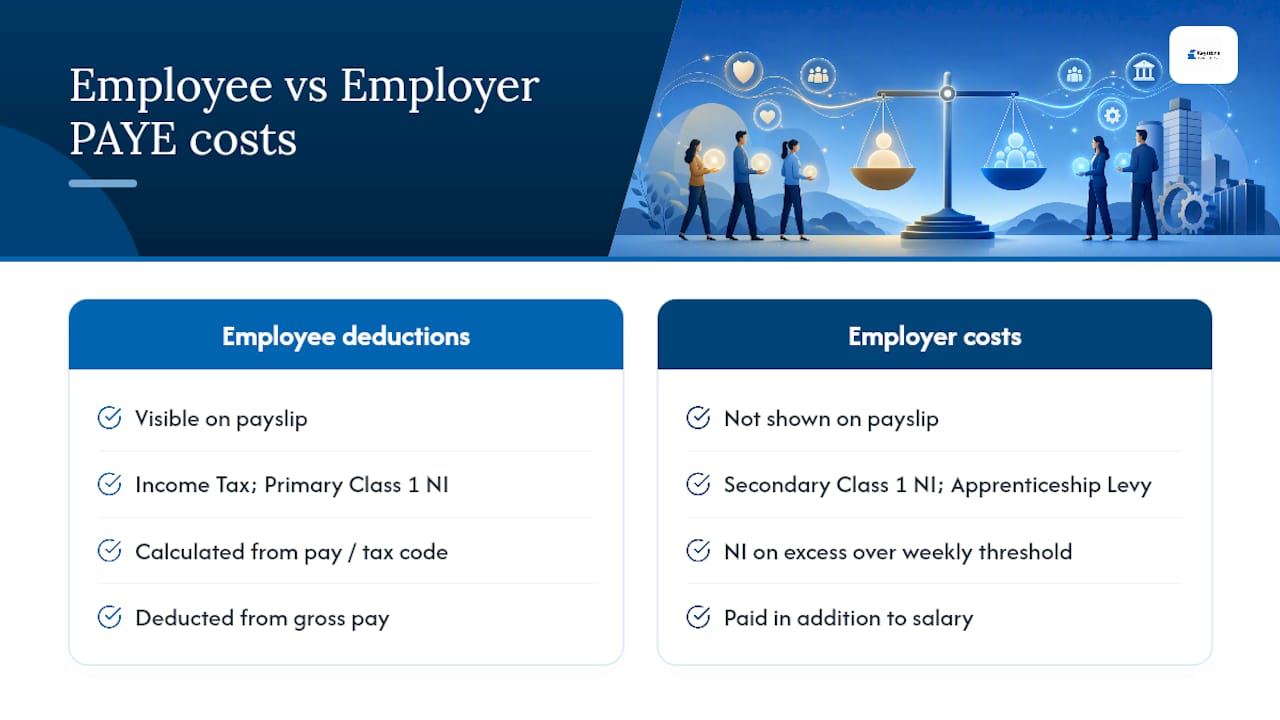
A simplified example: if an employee earns above the secondary threshold, the employer NI liability is calculated as a percentage of the excess over that threshold, added on top of gross salary. Budget for this separately when costing a new hire. Beyond Income Tax and National Insurance, PAYE is also the mechanism HMRC uses to collect the Apprenticeship Levy from larger payrolls and certain student loan repayment types, which is another reason payslip transparency matters. Employees should be able to see, line by line, exactly what’s been taken and why.
How to get payroll running: registration, software, and your first payday
Setting up payroll properly the first time saves a lot of retrospective correction later. Four steps get you there.
Register as an employer with HMRC and allow up to 15 days for your PAYE reference to arrive before you plan to pay anyone.
Choose payroll software or an outsourced provider. Look for RTI-compliant filing (so FPS and EPS submit correctly), automatic payslip generation, and built-in auto-enrolment pension support.
Collect and store employee details properly: full name, date of birth, National Insurance number, starter checklist or P45, and bank details. HMRC generally expects payroll records kept for at least three years after the relevant tax year.
Run your first-payday checklist: confirm employee details are correct, check tax codes match what HMRC or the starter checklist indicates, enrol eligible staff into a workplace pension, and submit your FPS on or before the payment date.
Pro Tip: Set a recurring calendar reminder for the 19th and 22nd of every tax month, not just payday. The FPS deadline is easy to remember because it’s tied to paying people; the EPS and payment deadlines get forgotten because nothing forces you to think about them.
What are the biggest PAYE compliance risks?
Three mistakes cause most of the trouble employers run into. Misclassifying a worker as self-employed when HMRC would view them as employed is the costliest, because a reclassification can trigger backdated tax, National Insurance, and penalties, sometimes years after the fact.
Late or missing FPS submissions and late payments form the second category, and they compound: HMRC’s penalty structure gets harsher the more often you’re late in a tax year. The third risk is quieter but catches seasonal and part-time employers specifically: HMRC can close a PAYE scheme after 120 days of no report or payment, which happens more easily than founders expect when a business pauses trading over winter or between seasonal runs.
A few controls fix most of this:
Keep a payroll calendar with FPS, EPS, and payment dates marked well ahead.
Send a nil EPS during any month with no employees paid, so the scheme doesn’t go inactive.
Reconcile payroll totals against your bank account monthly to catch submission failures early.
Get a second pair of eyes, internal or outsourced, on classification decisions before you onboard anyone borderline.
For a broader rundown of what typically goes wrong, Remotee’s guide to payroll compliance mistakes covers several of the same failure points from an operational angle.
When does payroll stop being a DIY job?
Most founders can run PAYE themselves at one or two employees on a single pay frequency with straightforward salaries. The calculus changes once headcount grows past a handful, pay frequencies multiply, or director pay starts mixing salary with dividends and benefits in kind.
At that point, the time cost of getting it right yourself usually exceeds the cost of getting help, and the penalty exposure from a missed deadline or a misjudged classification grows with every extra person on the payroll. A professional adviser doesn’t just file paperwork faster; they catch the classification and timing errors before HMRC does, which is where the real cost saving sits.
— Shoaib
Let KeystoneFA handle your payroll compliance
Running payroll accurately every month, on top of everything else a growing business demands, is exactly where founders lose hours they don’t have. KeystoneFA runs PAYE end to end: processing payroll, filing FPS and EPS on schedule, producing payslips, and dealing directly with HMRC when queries come up.
[

](www.keystonefa.co.uk)
The practical upside is straightforward. You get accurate deductions calculated correctly the first time, filings submitted before the deadlines that carry penalties, and one less compliance risk sitting on your desk while you focus on the business itself. If you’re also thinking about how payroll timing affects your broader tax position, KeystoneFA’s guide to year-end tax planning is worth a read alongside this one.
Get in touch through KeystoneFA’s site to talk through your payroll setup and get a straightforward quote for taking it off your plate.
Key HMRC pages worth bookmarking
For the official rules behind everything above, start with HMRC’s guidance on registering and running PAYE, the payment deadlines and process, and the overview of running payroll. For ongoing compliance updates, KeystoneFA’s blog covers changes as they land.
FAQ
What is PAYE and why am I paying it?
PAYE is HMRC’s system for collecting Income Tax and National Insurance directly from wages as they’re paid, spreading the tax owed across the year instead of one large bill. If you’re an employee, your employer deducts it automatically; if you’re an employer, you’re responsible for calculating, reporting, and paying it.
Do I get my PAYE tax back?
You can, if too much tax was deducted during the year, usually because of an incorrect tax code or a change in circumstances partway through. Overpaid tax is typically refunded automatically once HMRC reconciles your record, or you can claim it directly.
Do you need a PAYE scheme?
You need one if you pay any employee at or above the earnings threshold, provide employee benefits, or employ someone who has another job or a pension, including a sole director paying themselves a salary. If none of those apply, you may not need to register, but check your specific circumstances rather than assuming.
How do I cancel my PAYE scheme?
You close a PAYE scheme by telling HMRC you’ve stopped employing staff and submitting a final FPS or EPS marked as your last report. If you leave a scheme completely inactive without notifying HMRC, it can be closed automatically after 120 days of no reports or payments.
What happens if I file my FPS late?
Late or missing FPS submissions can trigger HMRC penalties, and the penalty structure gets stricter the more often it happens within a single tax year. Persistent lateness also increases the risk of your scheme being flagged for closer review.
Recommended