Avoid Moving Goalposts: Rolling Budgets with 5–8 Drivers for Founders

A rolling budget is a continuously updated budget that always extends a fixed future horizon, typically 12 months, by dropping the oldest period and adding a new one as time passes. The core benefit is simple: forecasts stay current all year, rather than going stale within weeks of a static annual budget being signed off. That currency lets founders and finance teams make faster, better-informed decisions on hiring, spending, and cash.
TL;DR:
Rolling budgets are most effective for fast-growing or volatile businesses that need real-time updates to support quick decision-making.
Limiting the model to five to eight key drivers and automating actuals integration help prevent the process from becoming too time-consuming or complex.
Maintaining a clear separation between the annual budget for governance and the rolling forecast for operational steering protects incentive alignment.
Monthly update cycles require disciplined data management and ownership, or the model risks drifting from reality within a few months.
Most small businesses can sustain a driver-based rolling budget using automation, especially with professional support to set up and maintain the process.
Table of Contents
What is a rolling budget? Terms, horizon and cadence
The term “rolling budget” covers the same idea as a continuous budget or, more loosely, a rolling forecast, though purists draw a line between a formal rolling budget and a rolling forecast used purely for steering. Whatever you call it, the mechanism is identical: as one period closes, a new one gets added at the far end, so the planning window never shrinks.
Most organisations settle on a 12 to 18 month horizon, according to CFO Upgrade’s analysis of rolling forecasting practice, updated either monthly or quarterly depending on how fast the business moves. A monthly cadence suits businesses with volatile revenue or short cash runways; quarterly works for steadier operations that don’t need weekly recalibration.
Why bother at all? Three reasons come up again and again among growing businesses:
Volatility. Markets, supply costs, or customer demand shift faster than an annual cycle can track.
Growth. A business scaling headcount or revenue quickly outgrows assumptions made nine months ago.
Investor expectations. Boards and investors increasingly expect a live forecast, not a static document defended long after it stopped reflecting reality.
How a rolling budget works, with a worked example
The mechanics rest on two rules. First, drop the oldest period and add a new one, so a 12 month rolling budget prepared in March 2026 always runs through to February 2027. Second, update using drivers rather than rebuilding every line item from scratch each cycle.
A driver is the handful of assumptions that actually move your numbers: units sold, average order value, headcount, churn rate, or cost per hire. BlackpeakCFO’s guidance on driver-based forecasting recommends anchoring the whole model to five to eight of these, not the fifty or more line items a traditional budget often carries.
Here’s how that plays out in practice:
January: you have a live 12 month forecast running to December. Actuals come in for January, so you drop it from the active window and lock it as historical.
You add January of next year to the far end, using your driver assumptions (say, 8% month on month growth in new customers).
You re-run the model against updated actuals, adjusting drivers where reality diverged from assumption.
You repeat monthly, so the horizon never contracts below 12 months.
Pro Tip: Build the model so changing one driver, like average order value, ripples automatically through revenue, gross margin, and cash. If you’re manually re-typing numbers into five different tabs each month, the model is too complex to survive a full year.
Driver-based rolling forecasts updated monthly can deliver materially better forward visibility and faster decision cycles than static annual budgets, particularly for businesses making frequent hiring or capital decisions.
Rolling budget versus static budget: which do you actually need?
A static, annual budget is a commitment: it’s approved once, tied to targets and often bonuses, and deliberately doesn’t move even when circumstances do. A rolling budget is an expectation: it’s revised on a fixed cadence to reflect what you now believe will happen, independent of what was promised twelve months earlier.
Most mature organisations don’t pick one over the other. They run a hybrid: an annual budget for governance and a rolling forecast for continuous visibility. Three hybrid patterns show up repeatedly:
Add without changing. Keep the annual budget exactly as approved; layer a simplified rolling forecast alongside it purely for internal steering.
Simplify and layer. Trim the annual budget down to fewer line items, freeing capacity to run a proper driver-based rolling forecast in parallel.
Forecast first, derive budget. Build the rolling forecast as the primary planning tool, then extract a simplified annual budget from it for board and compliance purposes.
The practical route for most founders is phased: start with the rolling forecast running alongside an unchanged annual budget, then let the balance shift as the forecast earns credibility.
Advantages of a rolling budget
The headline advantage is timeliness. A forecast built in October reflecting October’s reality beats one built the previous December and never revisited. That currency compounds into three concrete gains.
Improved forecast accuracy. Some practitioner sources report 10 to 15% better accuracy when organisations move to driver-based rolling forecasts integrated with real actuals, compared with a static annual budget defended long past its shelf life.
Faster decision-making. Hiring, capital allocation, and pricing decisions get tested against a live model instead of stale assumptions.
Better cash visibility. A rolling window surfaces cash pinch points months in advance rather than at quarter-end, when options have narrowed.
Tighter operational alignment. Teams work off current assumptions, not a plan drafted before the market shifted.
Fast-growing companies adopting rolling forecasts also report better investor communications, because a live number is a far easier conversation with a board than an annual budget everyone quietly knows is wrong.
Disadvantages and common pitfalls
Rolling budgets fail for predictable reasons, and most of them are avoidable if you know what to watch for.
Time cost at full detail. Attempting to update hundreds of line items every single month is the single most common way rolling budgets collapse under their own weight.
Moving goalposts. If targets shift every month with no anchor, teams start ignoring the numbers entirely, or worse, feel judged against a target that keeps changing beneath them.
Incentive misalignment. Bonuses tied to a forecast that moves monthly create obvious gaming risk: why hit a stretch target this month if next month’s forecast just gets adjusted down?
Data integrity gaps. Without an automated feed from your accounting system, a rolling model becomes a disconnected spreadsheet that drifts from reality within a few cycles.
ACCA’s guidance on rolling budgets is blunt on this point: the process demands real organisational discipline and solid data integration, or it simply wastes more effort than the static budget it replaced.
Pro Tip: If a monthly cycle keeps slipping past week three, the model is too granular. Cut line items until the update fits inside a half day, not a half week.
How to create and run a rolling budget: a step-by-step checklist
Building a rolling budget that survives past month three comes down to sequencing, not software.
Choose your horizon and cadence. Twelve months with monthly updates suits most growing businesses; quarterly updates suit steadier, lower-volatility operations.
Pick five to eight drivers. Revenue per customer, headcount, churn, and unit cost cover most business models without drowning the model in detail.
Simplify before you automate. Strip the underlying budget down to fewer line items so the rolling layer stays manageable month after month.
Align drivers to your profit and loss and cash flow. Every driver should trace a clear line to a number that actually matters, not sit in isolation.
Connect actuals via your accounting software. Manual re-entry is where rolling forecasts quietly die; an automated feed is what keeps them alive.
Set a fixed review cadence and stick to it. A rolling forecast reviewed sporadically is worse than no forecast at all, because it creates false confidence.
Before the first cycle runs, settle three governance questions:
Who owns updating each driver, and who signs off the final number?
What variance threshold triggers a conversation (5%? 10%?) rather than a silent adjustment?
What change control applies if a driver assumption needs revising mid-cycle?
Tools, integration and data needs
A rolling budget lives or dies on its connection to real numbers. Integration with your ledger or ERP system isn’t a nice-to-have here, it’s the difference between a forecast and a guess. ACCA notes that many rolling forecast projects fail precisely because they remain disconnected spreadsheets, never actually wired into the accounting system that holds the actuals.
Look for these capabilities when choosing or building your setup:
Driver templates that let you adjust one assumption and see it ripple through revenue, margin, and cash automatically.
Scenario modelling so you can flex a driver up or down and see the downstream effect before committing to a decision.
Variance dashboards that compare actuals against the last forecast, not the original annual budget, which is the more useful comparison for steering.
Automated actuals feeds from your accounting platform, so updates take minutes rather than a day of manual reconciliation.
Smaller businesses can often run this in a well-built spreadsheet with a live accounting export; mid-market organisations tend to need dedicated forecasting software once headcount and driver complexity grow past what one analyst can track by hand. Whichever route you take, managing cash flow properly underpins the whole exercise, since a rolling budget is only as useful as the cash visibility it produces.
Governance and behavioural best practice
The single most important governance rule: keep the annual budget for formal approval, board sign-off, and bonus calculations, and use the rolling forecast purely as a steering tool. ACCA’s research supports this separation, noting it protects incentive alignment and avoids the demoralising sense that targets keep moving beneath the team.
Present the rolling forecast as information, not as a board-approved plan requiring the same sign-off ceremony as the annual budget.
Measure variance against the prior forecast, not the original annual budget, since that’s the honest test of whether your assumptions are improving.
Protect bonus targets from forecast drift. If commission or bonus structures move every time the forecast does, expect sandbagging.
Set a fixed monthly or quarterly review meeting with clear approval rules for anyone changing a driver assumption mid-cycle.
Pro Tip: Ask each driver owner one question every cycle: “What changed since last month, and why?” If the answer is “nothing,” you don’t need a new number, you need to check the process is actually running.
When a rolling budget is (and isn’t) the right choice
Run through this checklist before committing time to the switch:
High volatility or fast growth? A rolling budget earns its keep here; a static one goes stale within a quarter.
Frequent operational decisions? If you’re making hiring or spend calls monthly, you need monthly-fresh numbers to make them against.
Investor or board reporting demands live numbers? A rolling forecast answers “what do you now expect” far better than an annual budget can.
Stable, low-change operations? A static annual budget with light quarterly reviews may genuinely be enough, and adding a rolling layer here is just extra admin.
The safest way in is a small pilot: run a simplified rolling forecast alongside your existing annual budget for two or three cycles before deciding whether to expand it, as outlined in this guide to accounting for pre-revenue startups.
The verdict on rolling budgets
A rolling budget earns its place wherever assumptions change faster than a calendar year, keeping decisions grounded in current reality instead of last December’s guesswork. Start by picking your horizon, narrowing to five or eight real drivers, and connecting actuals from your accounting system. KeystoneFA can help you build that model properly from the first cycle.
Lessons from advising founders on rolling budgets
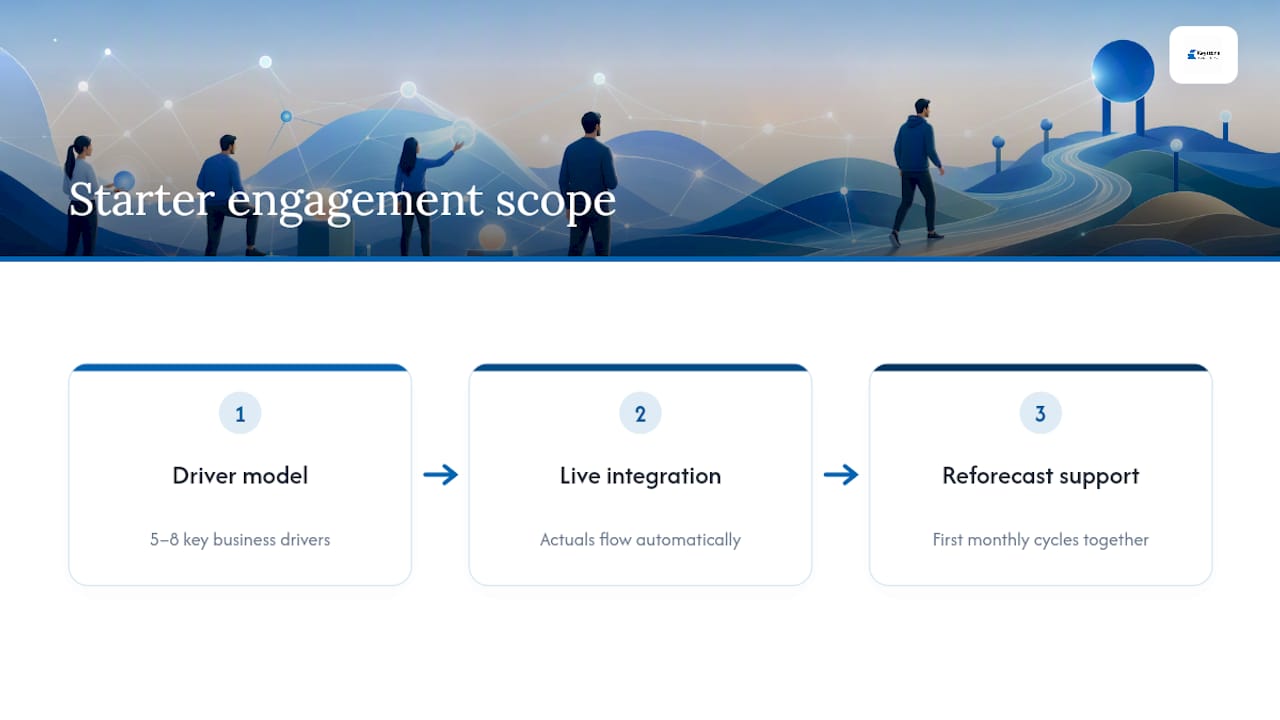
The constraint founders hit first is almost never the model itself, it’s time and buy-in. Someone has to own the monthly update, and if that falls to whoever’s least busy that week, the process dies within two cycles. The engagements that work best get phased: a simplified driver model in month one, actuals integration in month two, and a proper review rhythm by month three. Success by then looks unglamorous: a 20 minute monthly meeting where nobody’s surprised by the number, because the forecast already told them.
— Shoaib
How KeystoneFA helps you build a rolling budget that sticks
Most founders lose their rolling budget to the same failure mode: no automated link to actuals, so the spreadsheet quietly drifts from reality within two or three months. KeystoneFA’s starter package for rolling-budget implementation solves that directly, building your driver model, wiring it to your accounting data, and running the first few monthly reforecast cycles alongside you until the rhythm holds on its own.
[
](www.keystonefa.co.uk)
The engagement typically covers three things: a driver-based model built around the five to eight numbers that actually move your business, a live integration between that model and your bookkeeping so actuals flow through automatically, and hands-on support through your first several reforecast cycles. It sits alongside the wider range of accounting services KeystoneFA offers founders, from day-to-day bookkeeping to tax planning, so your forecast is always built on numbers that reconcile.
If margin pressure is part of why you’re considering a rolling budget in the first place, it’s worth reading how shrinking margins typically creep up on UK founders before your first driver session. Ready to get your rolling budget live? Get in touch with KeystoneFA to scope your starter engagement.
Sources
Claims in this article draw on ACCA’s technical guidance on rolling budgets, AccountingTools’ definition, CFO Upgrade’s comparison of rolling forecasts and annual budgets, and BlackpeakCFO’s implementation commentary.
FAQ
What does “rolling” mean in finance?
In finance, “rolling” describes a process that continuously moves forward with time rather than resetting at fixed intervals, dropping the oldest data point and adding a new one so the window stays constant, exactly as a rolling budget drops the oldest month and adds a new one.
What are the three types of budgets?
Budgets are commonly grouped into static (annual, fixed) budgets, flexible budgets that adjust for actual activity levels, and rolling budgets that continuously extend the forecast horizon; many growing businesses now combine a static annual budget with a rolling forecast layered on top.
How is a rolling budget different from a static budget?
A static budget is fixed once approved and used for formal governance and bonus targets; a rolling budget is updated on a set cadence, commonly monthly, so it always reflects current expectations rather than a commitment made months earlier.
How often should a rolling budget be updated?
Most organisations update monthly or quarterly, with monthly suiting volatile or fast-growing businesses and quarterly suiting steadier operations, according to CFO Upgrade’s guidance on rolling forecast cadence.
Can a small business realistically run a rolling budget?
Yes, provided it stays driver-based rather than tracking every line item; a small business with five to eight clear drivers and an automated actuals feed can sustain monthly updates without needing dedicated forecasting software, and KeystoneFA typically helps founders start exactly this way.
Recommended